 Voxor
Download Voxor
Download
Voxor
Download Voxor
Download If you are looking for a Wispr Flow alternative, start with what you would keep. Wispr Flow is fast and polished, and we will not pretend otherwise. The difference is architectural. Wispr is cloud-first, your audio goes to their servers to be processed. Voxor gives you a real selectable Local mode that transcribes and formats on your machine, with the same effortless flow on top. Private when privacy comes first, cloud when you want raw speed. You choose, per moment.
| Capability | Voxor | Wispr Flow |
|---|---|---|
| Local, on-device mode | Yes, selectable. On-device transcription and cleanup, Mac (Apple Silicon) and Windows (x64) | No, cloud-first by architecture |
| Offline (network cut) | Yes, in Local mode | Their privacy page: "Transcription always happens in the cloud" (read 22 Oct 2026) |
| Formatting by app type | Yes, on-device in Local mode. Detects chat, email, code or other and formats for that type unasked, and those four formats are yours to change. Mac (Apple Silicon) and Windows (x64) | Yes, cloud-side. Their Styles recognize named apps and websites and apply the matching writing style, a roster they extend release by release |
| Learns your words | Yes, custom vocabulary | Yes, dictionary |
| Cloud option for raw speed | Yes | Yes, the default |
| What Pro adds | Unlimited words, voice agents, Quick Picker and advanced Local mode | Unlimited dictations, longer Notetaker history, shared team dictionary and workspace, team billing and analytics |
| Free tier | Metered, 2,000 words a week | Metered, 2,000 words a week on desktop |
| Platforms | Mac (Apple Silicon), Windows (x64), iPhone, Android | Mac, Windows, iPhone, Android |
Sources: Voxor Desktop, verified selectable Local mode with on-device transcription. In Local mode the smart formatting (casual / formal) also runs on-device, offline-capable. Local mode is an option with a hardware floor, not a blanket property: a hardware scan recommends a model tier and declines below roughly 2 cores or 4 GB of RAM, read from Voxor Desktop's shipped hardware catalogue, 2026-08-25. Whether Wispr's formatting varies by app type was open on this page until 1 September 2026, when we settled it at their own changelog: Flow recognizes named apps and websites, Instagram, Discord and Signal as personal messaging and LinkedIn as work messaging, and applies the matching writing style there. That is the same shape as ours and we say so. What differs is where it runs: theirs cloud-side, ours on your machine in Local mode. That Wispr transcribes in the cloud is their own sentence rather than our inference. Their privacy page, read at the source on 1 September 2026 and again on 22 October 2026: "Transcription always happens in the cloud to provide the best speed and accuracy." Everything this page says about where your audio goes rests on that one line. Their public messaging leads on speed and accuracy rather than privacy, though their product carries real privacy machinery and it would be dishonest to imply otherwise. Their changelog records automatic pausing in 50-plus banking and financial apps and local storage options including auto-delete after 24 hours or never storing transcripts, and their pricing page lists SOC 2 Type II and ISO 27001 with a HIPAA-ready option on a signed agreement, all read 1 September 2026. Our claim against them is architectural, not a suggestion that they are careless with your voice. Read Wispr's current privacy docs yourself before you commit. What each Pro plan adds is read from each pricing page: Wispr's Pro card at wisprflow.ai/pricing on 12 October 2026 ("Unlimited dictations", "Longer Notetaker history", "Shared dictionary and snippets", "Shared team workspace", "Centralized billing and user management", "Team usage analytics", plus priority support and early access), and Voxor's Pro from the pricing section of voxor.ai as live since 8 October 2026. This page compares what the plans include, not what they cost; read both pricing pages for the prices. Above Pro, Wispr's team plans add single sign-on and org-wide policy controls (Growth) and directory provisioning (Enterprise). Both free tiers are metered, and on desktop both meters read 2,000 words a week, theirs read at their pricing page on 12 October 2026. Voxor runs on Mac, Windows, iPhone and Android.
Your audio goes to their servers to be processed. For many people that is a fine trade for the polish, and we respect it.
Turn on Local mode and your speech is transcribed and formatted on your machine instead of on a server. It is a mode you switch on, and it has a floor: a hardware scan picks the model tier your machine can carry and declines below roughly 2 cores or 4 GB of RAM, so this is an option we offer rather than a property of the product. And it stays effortless: the smart formatting hands you finished text, casual for the quick reply, formal for the client email, shaped to the kind of app it lands in.
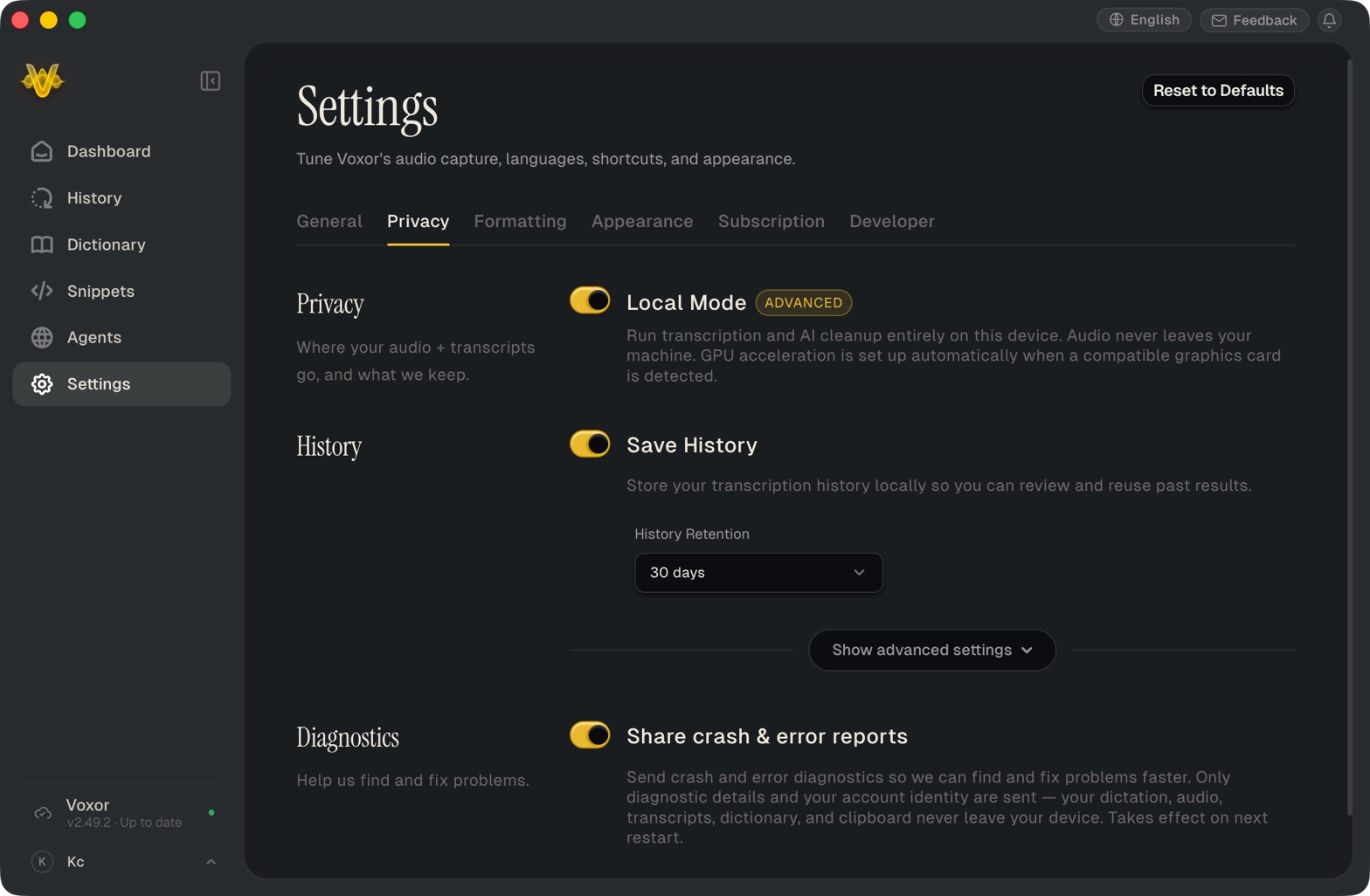
Local is the hero, but cloud is not the enemy. When you want raw speed and you do not mind the audio taking a server-side trip, Voxor has a cloud mode too. The point is not that local is morally superior. The point is that you get the choice: private when privacy comes first, cloud when you want speed, the same tool either way.
Unlimited words with no meter once you pay, voice agents that run your automations by voice, Quick Picker, and advanced Local mode, where transcription and formatting run on your machine. Built for getting more done at the desk.
Unlimited dictations, longer Notetaker history for meetings, and team features: a shared dictionary and snippets, a shared workspace, centralized billing and team usage analytics. Transcription stays in the cloud, by their own privacy page. Their Pro card says it is for individuals and teams.
Same speed you came for. Plus a Local mode that does the transcription on your machine and keeps working with the network cut.
Speak, and Voxor gives you the finished words. Private when you ask, fast when you want it. Built for the desktop.
Mac (Apple Silicon) and Windows (x64). Free tier metered at 2,000 words a week.
If you like Wispr Flow's speed but want your dictation processed on your machine, yes. Voxor keeps the effortless flow and adds a real selectable Local mode, where transcription and formatting run on-device. Wispr Flow is cloud-first by architecture.
Wispr Flow's privacy page says "Transcription always happens in the cloud" (read 22 October 2026). Voxor's Local mode runs transcription and formatting on your Mac or PC and, once it is set up, keeps working with the network cut, on hardware that meets its floor.
In Local mode, on your Mac. Your voice, its transcription, and the formatting that matches where you are typing all run on your machine. When you want the extra speed of the cloud instead, turn Local mode off in Settings, under Privacy, or use the Quick Picker if you have given it a shortcut.